

A school installs ten panels in March, and by July six sit unused. The wrong smart classroom provider causes that, not the screens.
The smart classroom market is projected to reach 19,004 million dollars by 2030.
This guide gives you ten checks, a list of red flags, and a worksheet to compare vendors before you sign.
Why Provider Choice Matters More Than the Screen
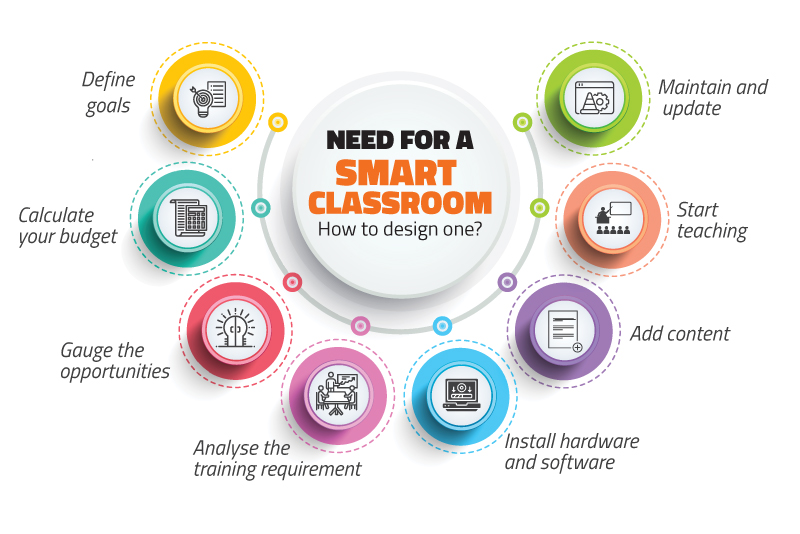
A smart classroom is a system. It combines displays, computing devices, audio, software, content, installation, and training.
If one piece fails, teachers stop using the room.
Smart classroom is more than hardware
Buying a display is easy. Running a classroom on it is harder.
The setup needs compatible hardware, curriculum-aligned content, reliable connectivity, and technical support.
Your vendor should also understand how teachers plan lessons, present content, and assess students.
Needs differ by budget, existing infrastructure, and teaching style.
What can go wrong
- Equipment may not work with your existing devices or software.
- Content may not match your curriculum or language needs.
- Teachers may get too little training.
- Installation problems may interrupt classes.
- Slow support can leave equipment unusable.
- Hidden subscription or upgrade costs can inflate the budget.
Look for a long-term partner
A good partner studies your school before recommending products. They fit the solution to your infrastructure. They keep training and support going after installation.
They also let you add classrooms later. Their advice should reflect your needs, not only what they sell.
Use the ten checks below to test this.
10 Checks Before You Sign
Check 1: Equipment range and compatibility
Ask what the vendor offers: interactive panels, smart TVs, projectors, OPS modules, speakers, microphones, and cameras.
Confirm that the display, operating system, software, computers, and audio all work together.
A big catalogue helps, but compatibility matters more. Ask for specifications, warranty documents, and an itemised equipment list.
Check 2: Site survey and needs assessment
A vendor who quotes without visiting is guessing. The survey should cover room size, seating, viewing distance, glare, wall strength, power points, and network access.
It should also consider student strength and subject needs.
Ask whether the survey is free or charged.
Request a written report with recommendations and any extra work needed.
Check 3: Installation team and timeline
Ask who handles mounting, cabling, configuration, testing, and handover. Find out whether it is the vendor’s own team or an outside contractor.
Check for experience in schools, since installers must work around class schedules.
Ask for a timeline that flags dependencies like electrical work. Every device should be tested before handover.
Check 4: Teacher training and onboarding
Training should cover daily tasks, not only device features.
Teachers should learn to present lessons, annotate, use the software, and fix small problems.
Ask whether refresher sessions exist for new staff.
Confirm whether training is onsite, remote, or recorded, and whether it costs extra. Request a schedule and written materials.
Check 5: Digital content and software
Ask which classes, subjects, and boards the content covers, such as CBSE, ICSE, or your state board.
Check language options. Review lesson formats, including videos, animations, exercises, and assessments.
Test whether it runs on your chosen display. Ask about offline access, licensing, updates, renewals, and what happens when the contract ends.
Request sample lessons and curriculum mapping.
Check 6: AMC and response time
AMC means Annual Maintenance Contract. Scope varies. Some cover scheduled maintenance and troubleshooting.
Others treat onsite visits and spare parts separately. A smart classroom provider should put response and resolution targets in writing.
The two are different. A vendor can acknowledge a complaint quickly and still take days to fix the room.
Also check support channels, working hours, escalation steps, and whether loan equipment is available.
Check 7: References and past projects
Ask for schools with similar size, board, and budget. Call them.
Ask about installation quality, training, support, and recurring costs.
Find out whether the equipment is still in regular use a year later.
A visit is even better. Long-term use says more than a successful launch.
Check 8: Brand support, warranty, and spare parts
Confirm the manufacturer and exact model of each major device. Ask whether the vendor is an authorised reseller or service partner.
Check warranty length, covered parts, exclusions, and the claim process.
Ask who handles a fault when the manufacturer and the vendor are different companies.
Confirm that spare parts and software updates stay available locally.
Check 9: Total cost, not just the quote
Ask for an itemised quotation. It should separate equipment, installation, software, training, and support.
Check whether GST, mounting, cabling, electrical work, and network upgrades are included.
List recurring costs, such as content licences, cloud services, and AMC. Compare costs over the full period of use.
| Cost item | What to verify |
| Equipment | Brand, model, quantity, specifications |
| Installation | Mounting, cabling, configuration, testing |
| Software and content | Licence type, coverage, renewal cost |
| Training | Included sessions, extra-session charges |
| Warranty and AMC | Duration, exclusions, service charges |
| Expansion | Cost of added rooms and devices |
Our guide to smart classroom equipment can help you check specifications line by line.
Check 10: Scalability
Many schools start with one room, then expand. Ask whether new displays can use the same content platform.
Check whether the vendor supports centralised management across rooms or branches.
Ask how updates, user access, and content distribution will work as you grow. Request indicative prices for future additions.
Score every vendor on the same ten checks. It is fairer than judging by demos alone.
Red Flags to Spot Early
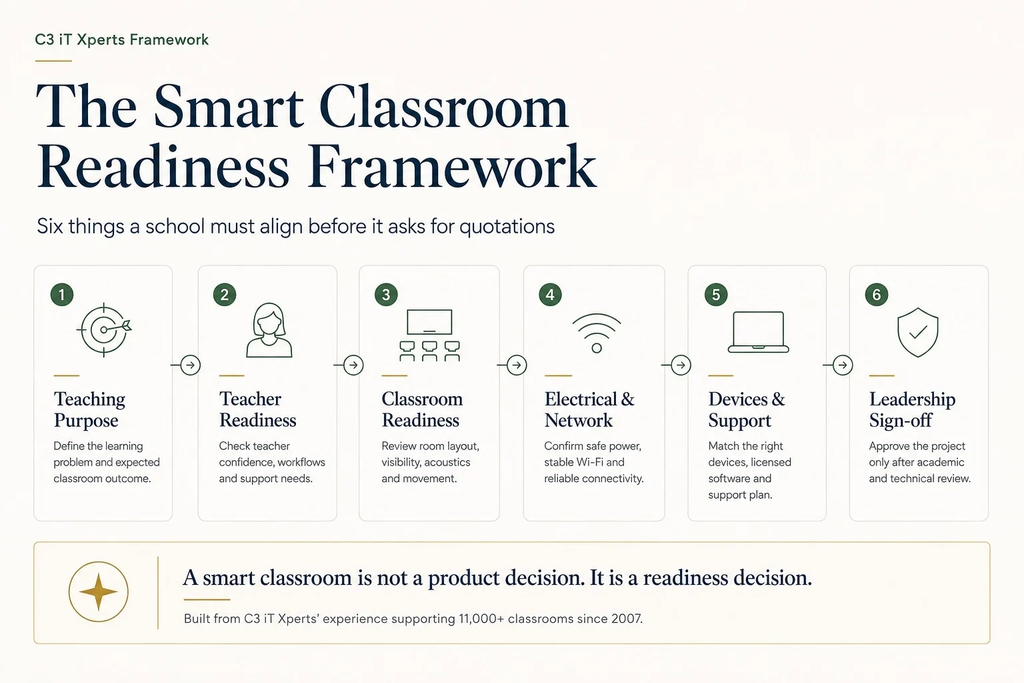
Some warning signs show up before you sign.
- Recommendations before questions. The vendor never asks about room size, teaching needs, or existing devices. The same package goes to every classroom.
- Staged demos. Only prepared content runs, on the vendor’s own device. Teachers cannot test their own material.
- Vague content details. There is no clear answer on curriculum, languages, offline use, or post-contract access.
- Training that stops at installation. There is no refresher plan and no support contact for problems during lessons.
- Verbal promises. Response times and warranty terms exist only in conversation.
- Hidden costs. Installation, cabling, training, renewals, or AMC are left out without explanation.
- No proof of experience. There are no case studies or references to back the claims.
- A system that is hard to expand. New rooms need new equipment, and compatibility is undocumented.
A vendor does not need every feature.
But a good smart classroom provider can explain what your school needs, what the proposal includes, and how they will support it.
Comparison Worksheet for Your Smart Classroom Provider
Send the same questions to every shortlisted vendor.
Compare their written answers, not their sales pitches. Copy this table into a spreadsheet and fill in one column per vendor.
Criteria:
- Equipment range and compatibility
- Site survey included
- Installation plan and timeline
- Teacher training and refreshers
- Curriculum and content coverage
- Warranty and brand support
- AMC and response-time commitments
- References from similar schools
- Itemised total cost
- Future expansion options
Add a simple scoring system
- 0: Not provided
- 1: Weak or unclear
- 2: Meets requirements
- 3: Strong, with clear evidence and a defined plan
Total the scores. Some items, such as essential compatibility, data protection, and acceptable warranty terms, are mandatory. A vendor who fails one should be dropped, whatever the total.
Questions for the final demo
- Can you run a lesson using our actual content?
- Does it work with the devices we already own?
- Can we test it without internet?
- What training will teachers get after installation?
- What response time will you commit to in writing?
- What recurring charges apply after year one?
- Can we speak to a similar school?
- What happens if we add more rooms?
Make the final decision
- Remove vendors that fail the mandatory items.
- Compare the rest on function, training, support, and total cost.
- Check references and written service commitments.
- Read the contract, renewal terms, and expansion costs.
- Pick the vendor with the most credible plan, not automatically the cheapest.
The best smart classroom provider is the one that still answers the phone in year three. Run the ten checks, watch for red flags, and score every proposal the same way.
Need help evaluating your options? Contact Trustnet Consultancy to discuss your classrooms, infrastructure, and installation needs.
Explore our smart classroom solutions or request a quote for your school.
FAQs
1. How do I choose the right smart classroom provider?
Choose a provider that offers compatible equipment, conducts a site survey, provides professional installation and teacher training, and offers clear warranty and maintenance support.
2. What should a smart classroom provider include in the quotation?
The quotation should list equipment, installation, cabling, software, digital content, teacher training, warranty, AMC, taxes, and any recurring charges.
3. Why is teacher training important when installing smart classrooms?
Teacher training helps educators use interactive displays, digital content, and classroom software effectively. It also reduces technical difficulties and encourages regular use of the equipment.
4. What should I check before signing a smart classroom maintenance contract?
Check the services covered, response and resolution times, onsite support, spare-part costs, exclusions, contract duration, and renewal charges. Get all service commitments in writing.