

The firewall passed the testing. But six months later, nobody responds when the network goes down. This gap separates network security companies that sell equipment from those that work behind it.
The network security market was $ 1.5 billion in 2025.
The wrong choice costs you downtime, data, and customer trust.
This guide gives you ten questions to ask, seven red flags to spot, and a simple scorecard. It suits SME owners, IT managers, and growing teams across Kolkata.
Use it before you request a single quotation.
Why Your Choice Matters More Than the Product
Your business runs on its network. Staff open shared files. Billing software talks to the server.
Branch offices connect over the internet.
Customers pay through systems that depend on all of it.
One weak point can stop everything. Common risks include unauthorised access, malware, unpatched devices, and data breaches.
Each one can cause downtime. Downtime means lost sales and unhappy clients.
Growing firms face an extra problem. Your network changes every year. You add staff, laptops, cameras, and branches.
A setup that fits today may fail in eighteen months. You need a provider who plans for that growth.
Here is a common scenario. A 40-person firm in Salt Lake buys a firewall on a low quote. The installer leaves after one day.
Three months later, a new branch opens, and nobody knows how to extend the setup. The firm pays a second vendor to redo the work.
A complete assessment with a clear support plan can avoid this cost.
Price is just another trap. The lowest quote may sound appealing but can omit testing, licenses, or support.
Either you pay later or remain unprotected.
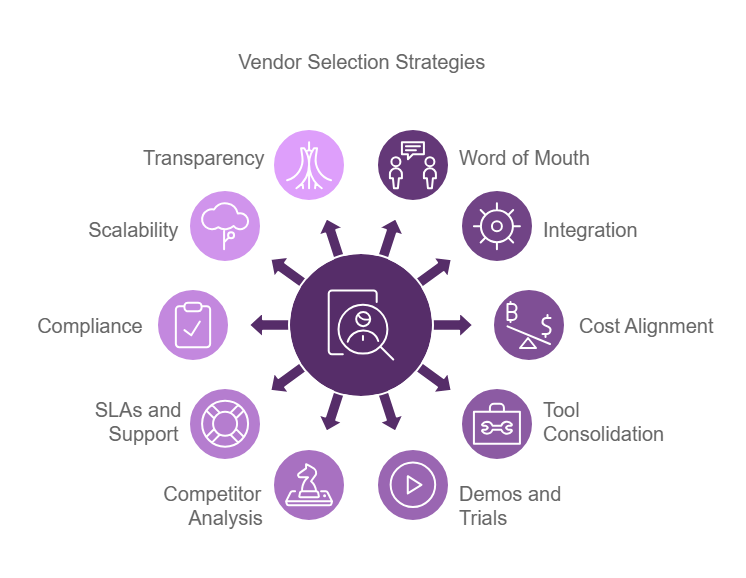
A good provider handles installation, configuration, testing, and ongoing maintenance. Judge every provider on all four.
10 Questions to Ask Network Security Companies Before You Sign
The right network security services in Kolkata assess your network first. It explains each recommendation in plain language.
This clarifies the support in writing and quotes the total cost.
Ask these questions. Specific, clear answers indicate a trustworthy partner; vague answers can create risk.
1. Can you cover what our business actually needs?
List your gaps first. Common ones include firewall protection, access control, secure Wi-Fi, and safe connections between offices.
Then ask the provider to assess your network before proposing anything.
Be wary of a standard package offered to every client. Pick a company for the gaps it closes, not the number of products it sells.
Ask it to explain what each component does and what it cannot do.
A confident provider admits limits.
2. What experience and certifications does your team have?
Ask who will configure your system. Find out how long they have worked on similar networks.
Ask how they handle troubleshooting and integration with existing equipment. Certifications help, but they do not prove delivery skill.
Ask for an example of a hard project.
What went wrong, and how did the team fix it? General IT experience is not the same as hands-on security work. Look for proof of the second.
3. What fits or only what you sell?
Providers often partner with specific manufacturers. That is not always a problem.
A specialised product can be the right answer. But partnerships can also shape advice.
Ask why they chose a product over its alternatives. Good answers cover compatibility, performance, and local support.
Check the warranty, license, and who manages manufacturer support when something doesn’t work.
4. Will the resolution match the existing network?
A proposal drafted without assessing the current setup is guesswork.
Ask if the provider will assess the network or opt for a site visit first.
They should review your servers, access points, devices, operating systems, and business applications. They should also explain the deployment plan:
- How long installation will take
- How much downtime to expect
- How they will test before handover
- How they will limit disruption to your staff
5. Who monitors the network and responds to incidents?
Many network security companies stop at installation.
Others offer monitoring and incident response. Find out which one you are buying.
Look for answers to these:
- Is monitoring continuous, or is it limited to working hours?
- Do they offer remote support, on-site assistance, or both?
- What happens during emergencies on non-working days?
- What’s the response time, and how long does it take to resolve the issue?
Those last two differ. A fast reply means little if the fix takes three days.
Match the support level to how much downtime your business can afford.
A retail store may have waiting time to spare. A hospital cannot.
6. Can you handle compliance requirements?
Regulators, clients and insurers may set security rules. Ask if the provider can document and support this.
This can include access logs, configuration records, and audit reports.
Installing a firewall won’t make you compliant. Ask which tasks stay with you, the legal advisor or the compliance expert.
A straight answer here shows maturity.
7. Can you show past work and references?
Ask for case examples or client references.
Prioritise projects of a similar size and network type. A school network and a five-branch trading firm face different problems.
Ask how the provider handled post-installation support. A company that vanishes after handover will not help you later.
Also review the quality of its proposals. Clear timelines and handover documents say a lot.
8. Will the solution grow with us?
Think about the next three years. You may add staff, branches, or connected devices.
Ask whether the solution can handle that without a full replacement.
Check hardware capacity, licence limits, and upgrade costs. Ask how a new office or remote team would join the setup.
Find out what happens to the existing investment during upgrades. Find a solution that works for current needs without limiting future growth.
9. What do AMC, contract, and warranty mention?
Read the annual maintenance contract (AMC) thoroughly. Remember what it covers:
- Preventive maintenance with troubleshooting
- Changes in configuration
- On-site visits
- Renewal terms and charges
You also need to check the warranty on the quality of work and equipment.
Ask who has the configuration records and admin access after installation.
Check how you can exit the contract. Never rely on a provider to access your own system.
10. What is the total cost of ownership?
The first quote is rarely the full price. Ask for an itemised quotation.
This should cover licenses, tools, testing, installation, training, and taxes.
Add the recurring costs later: AMC, upgrades, renewals, and replacements. You can compare providers with similar scope and services.
Evaluate what a single day of downtime means for your company, and compare that to the support costs.
The cheapest quote often leaves out something you will pay for later.
Red Flags to Watch For Before You Choose a Provider
Some warning signs show up before you sign. Watch for these when comparing network security companies.
- Quotes before an assessment. If a provider prices equipment without seeing your network, it is guessing. You may overspend or miss real gaps. An assessment protects you from both.
- Big guarantees with no scope. No solution stops every threat. Be cautious of anyone who promises complete protection. Ask what the solution covers and what risk remains.
- Vague answers on monitoring. If they cannot say who handles alerts or when support starts, expect trouble. Ask for service commitments in writing.
- A very low quote with unclear inclusions. Check for missing licences, configuration, testing, or maintenance. Low prices often hide extra charges.
- No clear accountability. You need a named point of contact and defined deliverables. Be careful if the provider avoids questions about experience or subcontractors.
- Fuzzy warranty or AMC terms. Watch for unclear exclusions and unstated renewal fees. Read the agreement before you commit.
- Installation treated as the finish line. Networks need updates, monitoring, and review after deployment. New threats appear and firmware ages. A provider that ignores this leaves you exposed.
A Simple Scorecard to Compare Providers
Speak to two or three providers. Then score each one the same way.
A scorecard keeps you from choosing on price or a smooth sales pitch alone.
| Criterion | What to check | Score |
| Technical capability | Covers your identified security needs | /5 |
| Expertise | Skills, certifications, project proof | /5 |
| Assessment | Reviews your network before proposing | /5 |
| Product fit | Explains choices and alternatives | /5 |
| Implementation | Clear deployment, testing, handover | /5 |
| Monitoring and support | Hours, response times, escalation | /5 |
| Compliance support | Clear responsibilities | /5 |
| Scalability | Supports growth and new sites | /5 |
| Contract and AMC | Scope, exclusions, warranty, renewals | /5 |
| Total cost | Clear upfront and recurring charges | /5 |
| Total | 50 |
How to use it
- Score each criterion from 1 to 5.
- Give 1 for poor or missing evidence. Give 3 for acceptable but incomplete. Give 5 for strong, documented proof.
- Mark unknowns as pending. Do not guess high.
- Compare providers on the same scope and quotation.
- Investigate any low score on a critical item.
What should matter most?
Prioritize security coverage, technical skill, and dependable support. Then check fit with your current setup and plans.
Review contract clarity and full cost last.
The highest total does not always win.
A weak score on incident response or core security coverage can outweigh strengths elsewhere.
Treat the score as a decision aid. It does not replace a technical review.
Choosing a provider comes down to evidence.
Ask for an assessment, clear support terms, honest costs, and proof of past work. The best network security companies welcome these questions.
They answer in plain language and put terms in writing.
Before that call, gather a few basics. Note your user count, office locations, and critical applications.
List your current hardware and any past incidents. Decide how much downtime you can tolerate.
This prep helps providers quote accurately and helps you spot weak answers fast.
Take this list into your next call.
Score every provider the same way.
Then choose the one that fits your network, risk, and budget.
Want a clear view of your current gaps? Request a network assessment from Trustnet Consultancy. Their team can review your infrastructure and explain which security solutions fit your business.
FAQs
What should I look for in a network security provider?
Look for relevant experience, clear recommendations, and compatibility with your current setup. Check support terms, scalability, contract clarity, and total cost.
How much do network security services cost in Kolkata?
Cost depends on network size, users, locations, equipment, licences, and support. Ask for an itemised quote based on an assessment. Do not compare on the first price alone.
How are network security services different from general IT support?
Network security focuses on protecting network infrastructure. That includes firewalls, access control, and monitoring. General IT support covers wider issues like devices, software, and daily troubleshooting. Some providers offer both.
Should a small business hire a provider or manage security in-house?
It depends on your team’s skills, budget, and risk. An in-house team suits firms with strong technical staff. An outside provider gives access to specialists and ongoing support.
Do Kolkata providers support businesses outside the city?
Some do. Many serve other parts of West Bengal and India. Confirm coverage, on-site engineer availability, remote support, and any travel charges.