
Your Wi-Fi drops every afternoon and your billing server times out. Weak planning causes most of these faults, and good IT networking services fix that at the root.
With India’s networking service market expected to reach $9.636 million in 2030, consider your needs before choosing one.
This guide shows what a typical package includes, what drives the price, and how to choose a provider.
It suits SME owners, office administrators, and IT managers who are setting up or upgrading a network.
What IT Networking Services Include for a Business
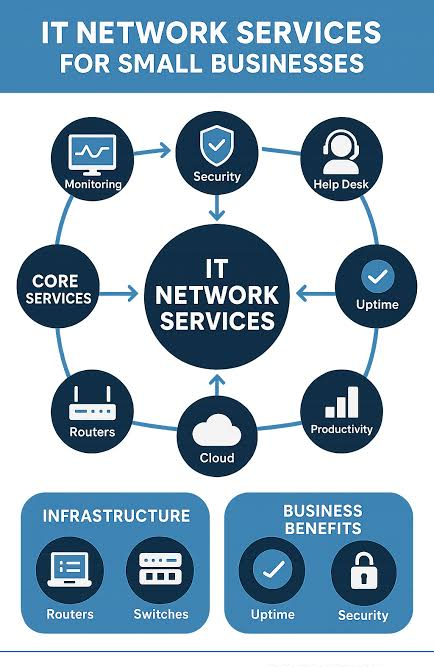
These services cover the planning, installation, configuration, monitoring, and maintenance of the network that connects your computers, servers, printers, and wireless devices.
Scope varies by provider. Some firms install equipment and leave.
Others run the network for you every day.
Always check the exact scope before you compare quotations. A lower quote often covers less.
Think of two stages.
Setup builds the network.
Management keeps it healthy.
Setup covers design and installation.
Management covers monitoring, troubleshooting, and updates. When a provider handles management for you, it is called managed networking.
You may require these when you:
- Start a new office or branch
- Experience slow connections, drops, or Wi-Fi dead zones
- Connect multiple departments, locations, floors
- Need stronger control over who gets access to what
- Add new employees or devices faster than the network can manage
The payoff is real. You get fewer outages, better access to business systems, improved visibility into faults and a network which grows with you.
Networking also differs from general IT support.
Support teams fix laptops, software, and user problems.
Networking focuses on connectivity: the cables, switches, routers, and Wi-Fi that link everything.
Network design and planning
A provider should study your office layout, user count, applications, and connected devices.
Then it plans the topology, bandwidth, equipment, and access point positions.
Planning prevents bottlenecks, dead zones, needless purchases, and expensive redesigns. Ask for a network diagram and configuration records at handover.
You may need these later.
Structured cabling with infrastructure
From patch panels and Ethernet cabling to switches, they link devices in the office.
The wired connections fit the fixed servers and desks.
They’re steadier than wireless links.
Fibre helps over long distances or between floors when bandwidth demands are high.
Good installers label, test, and document every cable. That saves hours during future faults.
LAN, WAN and VPN connectivity
A local area network (LAN) links devices inside one office. A wide area network (WAN) links separate offices.
Routers and switches direct traffic between devices and sites.
A virtual private network (VPN) gives staff and branches secure access to business systems over the public internet.
Wi-Fi setup and management
Walls, floors, interference, and the number of users all affect wireless performance.
A provider should test coverage and plan capacity before installation.
Set up separate access for staff, guests, and selected devices. Don’t rely on a single shared password for everyone.
Also remember that more access points will not fix a poorly configured network.
Security and access control
Basic network security involves VPNs, firewalls, access permissions, and segmentation.
Keep your guest Wi-Fi separate from sensitive business systems.
Apply firmware updates with security patches on time.
Be clear on one point. Basic security configuration differs from continuous threat monitoring and incident response.
The second may need a separate agreement. No equipment stops every threat.
Monitoring and troubleshooting
Monitoring can identify failing systems, unusual traffic and bandwidth bottlenecks in alerts, and reports show recurrent problems before they lead to longer outages,
Ask if monitoring is continuous, scheduled, or limited to the support time.
Also confirm that the agreement includes reports and corrective actions.
AMC and ongoing support
An annual maintenance contract (AMC) covers agreed maintenance and troubleshooting for your networking equipment.
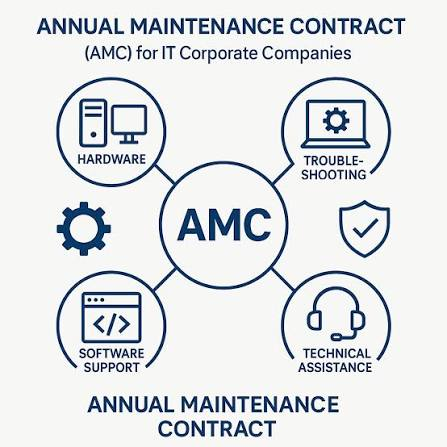
Typical inclusions are:
- Preventive inspections
- Diagnosis of faults
- Configuration checks and updating firmware
- On-site visits
Check if the AMC includes labour only or also involves replacement.
New installations, hardware replacement, upgrades, and post-installation support usually cost extra.
Review the response times, exclusions and renewal terms before signing contracts.
Single Office vs. Multiple Sites
A single office needs a solid LAN, good Wi-Fi, and sound access controls.
Several branches add WAN links, shared policies, and cross-site visibility.
Your needs differ accordingly.
| Requirement | Single office | Multiple offices |
| Core setup | LAN, switches, router, Wi-Fi | LAN at each site plus WAN links |
| Security | Firewall and access controls | Consistent policies across sites |
| Management | Central control for one site | Central visibility across sites |
| Growth | More users and access points | New branches and inter-site links |
| Main concern | Coverage and reliability | Connectivity and consistency |
A multi-site business may need a mix of technologies, not one standard package.
A professional assessment shows whether your current setup can grow or needs a redesign.
What Affects the Cost of Networking
Prices for IT networking services vary widely. Size, hardware, complexity, and support level drive the total.
Operators serve a population of $1.4 billion and maintain connectivity affordably with the rise in data.
Separate one-time setup costs from recurring charges. Then compare.
Here is a simple example. Two offices of 25 people each may need very different budgets. One sits on a single open floor.
The other spreads across two floors with thick walls and a server room.
The second needs more cabling, more access points, and more labour, even though the headcount matches.
Office size and device count
More users and devices mean more switches, access points, racks, and cabling.
The floor area alone doesn’t set the price. Wall materials, building layout, interference, and user density matter too.
Cabling and hardware
Cables, switches, fibre links, and access points all add up.
The brand, capacity, and warranty after pricing
Reusing compatible tools can cut the cost.
The hard cable routes and multiple floors increase the labour costs.
Complexity of design and installation
Design, assessment, testing, configuration and documentation — these are time-consuming processes.
Existing infrastructure, different departments, or the need to avoid downtime can add complexity.
A lower installation quote may skip testing, labelling or handover documentation.
Ask what this leaves out.
Security and performance needs
Firewall appliances, VPN systems, and segmentation drive the overall budget. Opt for advanced reporting with monitoring.
Continuous monitoring and advanced security work are often charged separately from the initial setup.
Number of sites
Each new branch brings extra hardware, a site survey, an internet link, and configuration work.
Secure links between sites and shared policies add further cost.
Ongoing support and AMC
A one-time fee differs from a recurring support charge. Ask whether support is priced per device, per site, per service, or as a bundle.
Longer support hours and tighter response times usually raise the price.
How to compare quotes fairly
Ask each provider for an itemised quotation. It should separate:
- Assessment and design
- Hardware and cabling
- Installation and configuration
- Security setup and testing
- Documentation and handover
- Monitoring and maintenance
- AMC, warranty, and replacement parts
- Taxes, exclusions, and optional extras
Then compare the total cost over a sensible period, such as three years.
A cheap setup can cost more if it needs frequent repairs, can’t scale, or omits essential support.
This guide gives no fixed price list.
Without a comparable benchmark, any number would mislead you. Ask for a quote based on your own office.
In-House, Outsourced, or Hybrid?
The right model depends on network complexity, internal skills, support needs, and budget.
In-house. Your own team knows your business and reacts fast. But you pay for salaries, training, and monitoring tools. You also carry a risk.
If one person holds all the network knowledge, their absence can stall everything. This model suits firms with an established IT team.
Outsourced. A provider brings broader expertise and a clearly defined scope of services. Small firms without network engineers gain the most.
Still, you keep responsibility for security decisions and access approvals. Check coverage, response commitments, and documentation.
Hybrid. Many businesses split the work. An internal employee handles users and business priorities. A specialist handles architecture, monitoring, and complex faults. This also helps during expansion or a major upgrade.
Write down who owns what. Otherwise, each side assumes the other is handling an issue.
Outsourcing is not automatically cheaper. An in-house team is not automatically better.
Compare total cost, skill coverage, continuity needs, and the control you want.

How to Choose a Provider
Price and equipment brands do not tell the full story.
Choose a provider that understands your setup, recommends fitting solutions, and supports them after installation.
- Relevant experience. Ask about projects of similar size. Request examples of office setups, Wi-Fi rollouts, or multi-site work.
- Clear scope. Confirm whether design, cabling, installation, testing, documentation, monitoring, and AMC are included or quoted separately.
- Technical fit. Ask why the provider recommends specific equipment. Check compatibility with your current hardware and applications.
- Security and reliability. Ask how it handles firewalls, guest networks, and fault detection. Confirm testing before handover.
- Support commitments. Check support hours, on-site coverage, and escalation steps. Ask whether response and resolution targets sit in a service-level agreement (SLA). A fast reply is not a fix.
- Room to grow. Ask how the setup handles more staff, floors, or branches. Check licence limits and future hardware costs.
- Contract terms. Review warranty, exclusions, renewal terms, and extra charges for travel or emergency visits.
- Assessment and references. Ask the provider to assess your network before recommending purchases. Request references from comparable clients.
Before you sign, also ask:
- What testing and documentation will we receive?
- How will installation affect daily work?
- Who keeps administrative access and configuration records if we change providers?
Answers should be specific and written down. Vague answers are a warning.
Good IT networking services start with an assessment and end with clear documentation and support.
Know your scope, compare itemised quotes, and match the service model to your team.
Then choose the provider that explains its choices in plain language.
Planning an office setup or an upgrade? Talk to Trustnet Consultancy about your network requirements. Its team can assess your current setup and suggest options for a single office or several sites.
FAQs
What does a business networking package usually include?
It can include network design, structured cabling, LAN and WAN setup, router and switch configuration, Wi-Fi installation, security configuration, monitoring, troubleshooting, and maintenance. The exact scope depends on the provider and the agreement.
How much does business networking cost in India?
Cost depends on users, devices, office layout, equipment, cabling, security needs, installation complexity, and support. Ask for an itemised quotation based on your own infrastructure.
What is the difference between LAN and WAN?
A LAN connects devices within one office or building. A WAN connects separate locations, so branches can reach shared business resources.
Does a small business need managed networking?
It can help if you lack in-house network specialists or need ongoing monitoring. The decision depends on network complexity, downtime risk, and what the provider’s agreement actually covers.
What is the difference between an AMC and managed network services?
An AMC usually covers set maintenance and troubleshooting for listed equipment. Managed services are broader and more proactive. They can include continuous monitoring, performance management, and configuration changes. Always check the contract scope.
How do I choose the right networking provider?
Compare experience, scope, technical fit, security practices, support commitments, scalability, and total cost. Ask for a network assessment and a written proposal that lists deliverables, exclusions, and responsibilities.