
School boards want smart classrooms to improve interactivity. A smart classroom combines digital technology, interactive teaching tools, and reliable connectivity to create a more engaging learning environment.
From interactive displays and audio systems to classroom management software, every component works together to support both teachers and students.
As schools continue to adopt digital learning, choosing the right smart classroom setup has become just as important as selecting the equipment itself.
This guide explains what a smart classroom is, its key benefits and features, and how schools can plan a setup that meets their educational goals.
What Is a Smart Classroom and Why Does It Matter?
A smart classroom uses connected technologies to improve teaching, collaboration, and classroom management. Rather than relying only on traditional teaching methods, it combines digital displays, audio systems, networking, and educational software to create an interactive learning experience.
Every school has different teaching requirements, classroom sizes, and budgets, making careful planning essential before choosing any solution.
Common Smart Classroom Setups
Interactive Smart Classroom: Offers touch panels, student-response tools, and collaboration software. These work well for hands-on, active learning.
Basic Digital Classroom: One display, basic audio, and a teacher workstation make for the simple digital classroom. This works well for smaller rooms and a school with a limited budget.
Hybrid Learning Classroom: Designed to teach students in rooms and online at the same time. This comes with cameras, robust audio systems, and reliable bandwidth.
Lecture Hall and Auditorium Setup: This setup is designed for large groups and requires several displays, distributed audio, and public address systems to reach every person in the room.
| Setup Type | Ideal Classroom Size | Best for | Key Equipment |
| Basic Digital | Up to 30 students | Standard classrooms | Display, basic speakers |
| Interactive Smart | 20–40 students | Active, project-based learning | Interactive flat panel, LMS |
| Hybrid Learning | 15–35 students | Blended in-person/online classes | Camera, mic array, video software |
| Auditorium/Lecture Hall | 100+ students | Lectures, assemblies | Multi-display, PA system |
Table: Setup Types
Key Benefits of a Smart Classroom
- Supports hybrid and completely digital teaching approaches
- Enhances student engagement with the right interactive learning
- Ensure collaborative lessons
- Makes classroom management simpler
- Easy scaling with growing technology requirements
Factors to Consider Before You Plan
Here are a few questions to ask before anything:
- What is the facility’s existing IT infrastructure?
- What is the size of the room and how many students can access it?
- What teaching approach do they follow, and what methods do the staff use?
- Will they need to scale up in future?
- What is the right budget for the setup?
Answering these honestly saves money down the line.
Why Planning Matters
Skipping this step is the most common reason digital classroom projects stall.
With poor planning, you get equipment that doesn’t fit the room, cables in the wrong places, and systems that don’t work well together.
Good planning means fewer installation delays, better use of every device, and room to expand without starting over.
Key Features and Equipment of a Smart Classroom
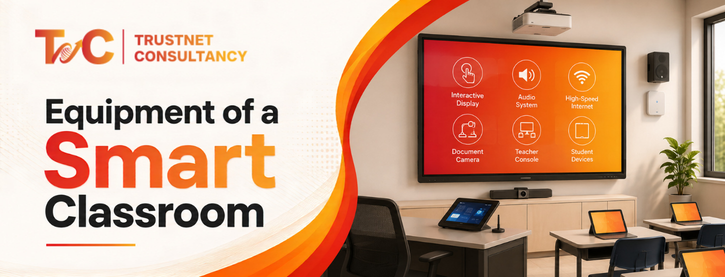
Once your setup is clear, plan on the hardware. The right combination of devices transforms a setup into a digital classroom.
Important Presentation and Display Tools
- Document cameras let teachers display physical materials, like books or worksheets, in real time.
- Interactive flat panels or smart boards: these work as the visual centre, used for annotation, lessons, and screen sharing
- Projectors: these work well in bigger rooms and for tighter budgets.
Audio and Communication Systems
- Classroom speakers: make sure teachers and lecturers are audible to every student, especially in larger rooms.
- Public address systems: these connect the school announcement systems to classrooms
- Wireless microphone: trainers and teachers can move freely while being audible to all
Supporting Software and Hardware Systems
- Learning management systems (LMS) to organize lessons, assignments, and grading
- Student systems and devices for more engaging learning for remote students
- Teacher work setup acting as a control point for all devices and lessons
- Software for classroom management to help teachers track and guide system use
- UPS and power backup: keeps the room running during outages
Connectivity and Networking
A smart classroom works well only with the right connectivity.
What you need is:
- Strong LAN systems for wired devices
- Reliable Wi-Fi coverage across the whole room
- Stable and consistent internet bandwidth for using cloud tools and streaming
- Network security systems safeguarding school and student data
Smart Classroom Setup Guide for Schools
Purchasing the perfect gear only does half the job. The installation is the key. IT decides if it works at all.
Classroom Prep
Before plugging in any equipment, check:
- Internet strength and cable routing
- Outlet placement
- Displays for everyone to see
- Furniture placement to not block speakers or screens
System Integration and Installation
This is where things usually go wrong. From audio systems, displays, and networks to software—these need to work as one comprehensive system, not as separate systems plugged in.
A microphone that doesn’t sync with the speakers or a display that isn’t properly networked creates daily friction for teachers.
Proper integration means every piece talks to the others, and the teacher only needs to focus on one control point.
Training and Consistent Support for Teachers
The best smart classroom technologies need the right teacher training. Supporting teachers in understanding equipment use ensures that every feature is effectively used.
New tools and equipment fail without the right training. The trainers need to know:
- Ways to operate the main equipment with confidence
- Essential steps for troubleshooting common problems
- The time and process of software updates
- System update needs
- Understanding of preventive maintenance
- Overlooking regular maintenance until something breaks
Short and hands-on training can save months of frustration in the future.
Good training courses covering basics of hardware, daily troubleshooting, and simple maintenance pay off.
Mistakes You Should Avoid
- Selecting tools that don’t work well for the facility
- Skipping through or rushing the training process to save time
- Ignoring network needs until an emergency occurs
Every mistake can be avoided with perfect planning and installation assistance. A smart classroom is more than just a few digital tools. It combines the right technology, careful planning, proper installation, and ongoing support to create a comprehensive learning environment.
Schools that plan first and install with integration in mind end up with classrooms that stay useful for years, not just until the next upgrade cycle.
If you’re planning to build a smart classroom, TrustNet Consultancy provides end-to-end support—from planning and equipment selection to installation, networking, audio-visual integration, and ongoing maintenance—helping schools create connected, future-ready learning environments.
FAQs
1. What is the difference between a smart classroom and a digital classroom?
A digital classroom primarily uses digital content and presentation tools, while a smart classroom combines interactive technology, connected devices, software, and networking to create a more engaging and collaborative learning experience.
2. Can existing classrooms be converted into smart classrooms?
Yes. Most schools can upgrade existing classrooms by adding interactive displays, audio systems, networking infrastructure, and classroom management software without constructing new spaces.
3. How often should smart classroom equipment be maintained?
Routine inspections, software updates, and preventive maintenance should be scheduled throughout the year. Regular servicing helps improve performance, extend equipment lifespan, and reduce unexpected downtime.
4. Who should be involved when planning a smart classroom setup?
Planning should involve school administrators, IT teams, teachers, and the installation partner. Their combined input helps ensure the technology supports teaching needs, infrastructure requirements, and future expansion plans.